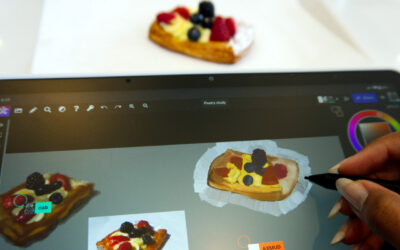


A new all-in-one experience for creative professionals who demand more from their tools, Wacom MovinkPad Pro 14 brings the natural feel of pen-on-paper into a high-end digital art station on the go. It's an immersive creative experience that goes beyond expectations.
With its beautiful 14” OLED display, Wacom Pro Pen 3, and Android 15 OS, it’s a truly portable professional solution, and next-gen beta features like Instant Pen Display Mode means it'll keep innovating alongside you.
If you have questions about the device, we have answers. Here's everything you need to know about the new Wacom MovinkPad Pro 14.

Professional Power In A Truly Portable Package
Despite the large 14" screen, Wacom MovinkPad Pro is made with a thin, lightweight, yet durable magnesium frame, making it easy to carry to the studio or a client's office. There’s no need for a laptop – it uses Android 15, so everything’s built in. Use the included software or download your favorite creative app from the Google Play store.
Equipped with a quad-core Snapdragon 8s Gen 3 processor, 12GB of memory, and a 256GB hard disk (with an SD card slot to expand if needed), enjoy smooth performance on the go even during memory-intensive tasks, and plenty of room to store all your creations.
Do you need a computer to use Wacom MovinkPad Pro?
MovinkPad Pro is an Android-based all-in-one tablet that works on its own – no computer needed. It comes with built-in Wacom apps and a Clip Studio Paint trial, and more apps can be downloaded from the Google Play store.
What kind of processor, memory, and storage does MovinkPad Pro have?
MovinkPad Pro has an 8-core Snapdragon® 8s Gen 3 processor, an Adreno 735 GPU, and 12GB RAM for smooth, virtually lag-free drawing, even on complex canvases. It comes with a built-in 256GB hard disk, but also has a microSD slot (compatible with SD cards up to 2TB).
How thin is the MovinkPad Pro? How much does it weigh?
At only 10mm thick and 1.6lbs, Wacom MovinkPad Pro 14 is extremely thin and light for ultimate portability. This is possible due to high-quality magnesium construction for both lightness and durability.

A brilliant OLED display designed for pure creation
The bright and high-contrast 14” OLED display features 3K resolution and a wide color gamut for crisp, vivid colors and exceptionally deep blacks. Direct Bonding, a 1ms response time, and a 120Hz refresh rate means virtually no parallax or lag.
Our signature etched glass has the perfect amount of “grip” for that pen-on-paper feel. And with Premium Texture treatment and best-in-class palm rejection technology, we’ve reduced reflections, fingerprint smudges, and errant marks. With a display this accurate and responsive, you can stay fully immersed in your creative work – almost forgetting you’re working on a digital screen at all.
What resolution, aspect ratio, response time, and refresh rate does the MovinkPad Pro display have?
MovinkPad Pro has a 14-inch OLED display with 3K (2880 x 1800px) resolution and a 16:10 aspect ratio. It has a 1ms response time and up to 120Hz refresh rate.
What kind of color, contrast, and brightness does MovinkPad Pro have?
MovinkPad Pro can display over 1 billion colors, at 10-bit depth, with full sRGB & DCI-P3 coverage. OLED technology means it has a 100,000:1 contrast ratio for very deep blacks, and it has HDR support for a peak brightness of 900 nits.
What does the MovinkPad Pro display look and feel like?
MovinkPad Pro has Wacom's signature Direct Bonding and etched glass for a natural pen-on-paper feel. It also has Premium Texture Coating, so it reduces glare, fingerprints, and reflections for minimized distractions.

The ultimate precision and flow with Wacom Pro Pen 3
Wacom Pro Pen 3 combines a design inspired by professional-grade mechanical pencils with cutting-edge EMR technology to deliver our smoothest, most accurate drawing experience.
It detects slight variations in angle, pressure, speed, and tilt with exceptional precision. The included slim Pro Pen 3 is built for portability and ergonomics with a built-in nib holder. Alternate grips, button configurations, and pen nibs are also available for further customization.*
*Alternate grips, buttons, and nibs are sold separately.
What kind of stylus does MovinkPad Pro come with? What kinds of pens is it compatible with?
MovinkPad Pro comes with a slim and portable version of Pro Pen 3 that includes a built-in nib holder. It is compatible with other Wacom pens, including the Wacom One pen, and third-party EMR pens from brands such as STAEDTLER, LAMY, and Dr. Grip.
Is the Pro Pen 3 customizable?
The Pro Pen 3 that comes with MovinkPad Pro can be customized by purchasing alternate grips and buttons, including the new wood grip, sold separately.
What pressure sensitivity does Wacom Pro Pen 3 have? What is its report rate? Does it need to be charged?
Wacom Pro Pen 3 has 8,192 levels of pressure sensitivity and a 300rps report rate, so you can flawlessly capture the lightest lines and heaviest brush strokes with perfect consistency. And like all Wacom pens, it is battery-free, so it needs no charging.

Your experience drives innovation forward: Wacom Lab and Instant Pen Display mode
With MovinkPad Pro 14, you can join Wacom Lab: an experimental creator community where we beta-test the latest features and services, unlocking even greater possibilities.
The first Wacom Lab beta feature is Instant Pen Display mode, which allows you to easily convert your device into a pen display. Draw directly on the screen, utilizing the same applications that are running on your Windows or Mac, for double the creative utility.
What is Instant Pen Display mode?
Instant Pen Display mode effectively allows you to connect your MovinkPad Pro to your computer and use it as a pen display, in addition to using it as an all-in-one portable drawing pad. Instant Pen Display mode can be used wirelessly via Wi-Fi or wired with a USB-C cable.
How do I use Instant Pen Display mode?
To use Instant Pen Display mode, you must download the Instant Pen Display app onto your MovinkPad Pro and your computer, then go through a setup process to activate the mode.
What are the compatibility requirements for Instant Pen Display mode?
It's compatible with Windows or macOS computers. At this time, Windows computers must utilize Windows 11. ARM-based Windows computers are not compatible. macOS computers must use macOS 14 or higher, including macOS 26 (Tahoe). Intel-based Mac computers are not compatible.

Ready to Draw BEYOND?
Click here to learn more about Wacom MovinkPad Pro 14.
Ready to buy? MovinkPad Pro 14 is available to purchase at the Wacom eStore! It's also available to purchase at Best Buy, MacHollywood, B&H Photo, or Amazon.
Frequently Asked Questions
What does the MovinkPad Pro display look and feel like?
MovinkPad Pro has Wacom's signature Direct Bonding and etched glass for a natural pen-on-paper feel. It also has Premium Texture Coating, so it reduces glare, fingerprints, and reflections for minimized distractions.
What resolution is the MovinkPad Pro display?
MovinkPad Pro has a 14-inch OLED display with 3K (2880 x 1800px) resolution.
What kind of color range does MovinkPad Pro have?
MovinkPad Pro can display over 1 billion colors, at 10-bit depth, with full sRGB & DCI-P3 coverage.
What kind of stylus does MovinkPad Pro come with?
MovinkPad Pro comes with a slim and portable version of Pro Pen 3 that includes a built-in nib holder.
What pressure sensitivity does Wacom Pro Pen 3 have?
Wacom Pro Pen 3 has 8,192 levels of pressure sensitivity, so you can flawlessly capture the lightest lines and heaviest brush strokes with perfect consistency.
Is the Pro Pen 3 customizable?
The Pro Pen 3 that comes with MovinkPad Pro can be customized by purchasing alternate grips and buttons, including the new wood grip, sold separately.
What is the Pro Pen 3's report rate?
Wacom Pro Pen 3 has a 300rps report rate.
Does Wacom Pro Pen 3 need to be charged?
Like all Wacom pens, Wacom Pro pen 3 is battery-free, so it needs no charging.
What kinds of pens is Wacom MovinkPad Pro compatible with?
It is compatible with Wacom Pro Pen 3 as well as other Wacom pens, including the Wacom One pen, and third-party EMR pens from brands such as STAEDTLER, LAMY, and Dr. Grip.
What contrast ratio does Wacom MovinkPad Pro have?
OLED technology means the Wacom MovinkPad Pro display has a 100,000:1 contrast ratio for very deep blacks.
How bright is the Wacom MovinkPad Pro display?
Wacom MovinkPad Pro has a peak brightness of 900 nits.
What aspect ratio is the Wacom MovinkPad Pro display?
Wacom MovinkPad Pro has a 16:10 aspect ratio.
What refresh rate is the Wacom MovinkPad Pro display?
Wacom MovinkPad Pro has an up to 120Hz refresh rate. It can be set to 60Hz to save battery life.
What response time does the Wacom MovinkPad Pro display have?
The Wacom MovinkPad Pro display has a 1ms response time.
Do you need a computer to use Wacom MovinkPad Pro?
MovinkPad Pro is an Android-based all-in-one tablet that works on its own – no computer needed. It comes with built-in Wacom apps and a Clip Studio Paint trial, and more apps can be downloaded from the Google Play store.
What kind of processor does MovinkPad Pro have?
MovinkPad Pro has an 8-core Snapdragon® 8s Gen 3 processor and an Adreno 735 GPU.
How thin is the MovinkPad Pro? How much does it weigh?
At only 10mm thick and 1.6lbs, Wacom MovinkPad Pro 14 is extremely thin and light for ultimate portability. This is possible due to high-quality magnesium construction for both lightness and durability.
How much memory does MovinkPad Pro have?
Wacom MovinkPad Pro has 12GB of RAM.
How much storage does MovinkPad Pro have?
MovinkPad Pro comes with a built-in 256GB hard disk, but also has a microSD slot (compatible with SD cards up to 2TB).
What is Instant Pen Display mode?
Instant Pen Display mode effectively allows you to connect your MovinkPad Pro to your computer and use it as a pen display, in addition to using it as an all-in-one portable drawing pad. Instant Pen Display mode can be used wirelessly via Wi-Fi or wired with a USB-C cable.
How do I use Instant Pen Display mode?
To use Instant Pen Display mode, you must download the Instant Pen Display app onto your MovinkPad Pro and your computer, then go through a setup process to activate the mode.
What are the compatibility requirements for Instant Pen Display mode?
Instant Pen Display mode is compatible with Windows or macOS computers. At this time, Windows computers must utilize Windows 11. ARM-based Windows computers are not compatible. macOS computers must use macOS 14 or higher (including macOS 26, Tahoe). Intel-based Mac computers are not compatible.