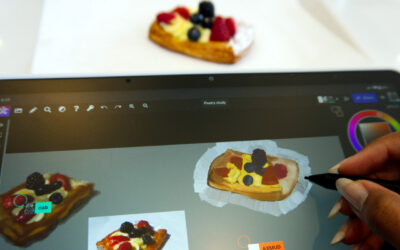
Wacom MovinkPad 11 is a breakthrough all-in-one portable creative pen tablet that redefines what a digital drawing device can be. Unlike entertainment-focused tablets, it’s built for drawing with its tactile screen, precise pen, and Quick Draw technology. It’s the perfect on-the-go companion if you’re just starting your digital art journey, love to doodle between classes, or are moving up from drawing on a smartphone.
Across the internet, artists and tech enthusiasts have been getting their hands on the device and sharing their thoughts. We've collected a bunch of Wacom MovinkPad 11 reviews into one place in this blog post so you can see what all kinds of different people think about the new tablet!
Artismia: "The drawing experience is pure magic."
In his Wacom MovinkPad 11 review, Artismia gave the device a try by drawing some Fantastic Four fanart. Overall, he loved it! Here were some of his favorite things:
- Drawing experience with Pro Pen 3
- Paper-like feel of the anti-glare etched glass
- Simplicity of the Wacom Canvas app
- Included two years of Clip Studio Paint app
- It's an all-in-one, standalone tablet
- Lays flat with no camera bump
He did have some critical feedback, though. While he liked the simplicity of the Wacom Canvas app, he said this could frustrate some users. The 128GB onboard storage, with no microSD port to upgrade storage, felt low (though it can connect to external hard disks for extra storage). He felt like the processor speed could lag for some complex tools in Clip Studio Paint, and thought the screen could be a bit brighter.
He also made a Short showing himself using Infinite Painter on the MovinkPad 11!
Aaron Rutten: "A wonderful tablet for artists of all ages."
"As convenient as a real-life sketchbook, but much more capable ... pure uninhibited drawing pleasure." That's how Aaron Rutten describes the Wacom MovinkPad 11 in his review. Overall, he thinks it's a great device, especially for young creatives. He showcases the functionality of Krita, Infinite Painter, and the included Wacom apps, and even surveys a few children to see what they think (they liked it)!
He also demonstrates that handwriting on the device "rocks," so it could be a good option for creative college students who need the it to do double-duty as a note-taker in academic classes. He does say that it's a "fine tablet for adult artists, too!"
Stacey Roshan: "The device I've been dreaming of for classroom use."
For a slightly different take, veteran educator and classroom technology enthusiast Stacey Roshan had a lot to say about how educators can use the Wacom MovinkPad 11.
First, Roshan loved the design of the device itself – it's thin, light, and portable. Then, she explored some of the built-in apps, like Wacom Canvas. She talked a bit about how good it feels to write on the MovinkPad 11, using both the Pro Pen 3 that comes with the device and some of the third-party pens that she's used to using. But mostly she was excited to talk about the different web-based education apps she uses and the ways she was able to utilize them in the classroom.
Using Kami, she showed how she could have a visual activity – in her video, she shows an "All About Me" T-shirt activity – on your Kami page, and project it from your desktop computer onto a projector screen in your classroom. But, because the application is web-based, you can edit the project wirelessly from your Wacom MovinkPad 11 and have it update live in front of your class. There's no need to be connected in, or to figure out how to project from the device in your hands! Using web apps makes it simple and seamless. She also shows how she uses Canva, Lucid Spark, and OneNote for other classroom uses.
Brad Colbow: "As seamless as possible just to jump in and start drawing."
Brad Colbow was primarily impressed by the Wacom MovinkPad 11's affordability, especially compared to its peers! But he had a lot of other good things to say, too, about its design – including how the lack of camera bump makes it usable for drawing on a flat surface – and the display: its colors, screen resolution, and optional 90hz refresh rate (the default is 60hz to save battery life). Overall, he says that it's a very good quality all-in-one Android tablet for its price: "It's not cheaping out anywhere, and it's not overachieving anywhere – until you get to the pen." Colbow loves the Pro Pen 3.
Overall, he recommends it compared to similar devices from XP-Pen and Samsung!
Teoh on Tech: "Because the pen performance is fantastic, the drawing experience is fantastic."
Teoh on Tech is a Singaporean reviewer focusing on graphic design and digital art. Because he's based in Singapore, he also reviews the Wacom MovinkPad 11 Case with Stand, which is not yet available in some regions, including the United States, but will be available soon!
He gets right to the point with his review: "I have reviewed many Android tablets, and not many have the combination of good pressure, tilt recognition, and palm rejection. These are the three most important features for drawing, and Wacom has nailed almost all the things that contribute to a wonderful drawing experience." He also liked that there was no bloatware on this Android device, that the color quality, screen resolution, refresh rate, and brightness were good, and that because it's an Android device, one can download one's own preferred drawing apps if they don't like Wacom Canvas or Clip Studio Paint.
Overall, he says this: "The Wacom MovinkPad 11 can definitely compete with the iPads or Samsung Galaxy tablets as portable drawing tablets."
Bonus Reviews!
The reviews below are a little atypical, but the Wacom MovinkPad 11 is a big departure for Wacom, at least in recent years. Check them out!
Mike Chia: Impromptu Teenager Reactions
The Wacom MovinkPad 11 is primarily marketed for younger, beginner, or entry-level artists on-the-go. So we were thrilled when Mike Chia uploaded this video, wherein he gives a Wacom MovinkPad 11 to a couple of teenagers to get their immediate, unfiltered reactions! So what did they think?
"It actually understands the strokes," they say, comparing the pen pressure and accuracy to that some other similar tablets. When they use another similar product, it "looks fake," they say. Would it be worth it save up their money so they can get one? "It feels more worth it to buy, especially if I want to draw a lot," they conclude.
A review by a demon?
In this Japanese-language video, Deepblizzard, the "Drawing Demon King," gives an in-depth review of the Wacom MovinkPad 11. While it's in Japanese, if you don't speak that language YouTube's automatic dubbing feature can translate it for you, and the Demon King also provided English captions. If you wanted to know what an anime/manga drawing demon creature thinks of the device, this is the video for you!